Dictate documents by voice · Windows

Voice typing in Word

Dictate reports, articles, contracts and letters straight into Microsoft WordLuviomic recognizes your speech, removes “um”s and slips and inserts clean, ready text at the cursor. Voice typing in Word with no add-ins and no layout switching.

Cursor in the document · Ctrl + Alt + Q · speak — text in Word. Audio is never stored.
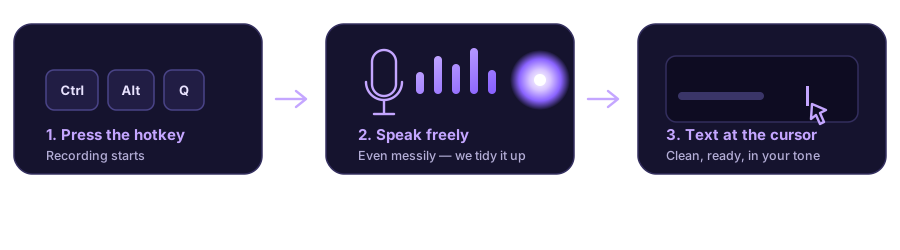
Voice typing in Word: press Ctrl+Alt+Q, speak, ready text appears in the document at the cursor

How to turn on voice typing in Word

Nothing to set up inside Word — it works over any editor.

Open your Word document

Place the cursor where the text should appear.

Press the hotkey

Ctrl + Alt + Q by default. A glow lights up at the cursor — recording is on.

Speak — text appears in the document

Clean, polished, in the tone you chose. Press again to stop.

Voice input in Word and beyond

One dictation app for all documents and Windows apps.

Straight into Word

Text is inserted at the cursor in Microsoft Word — as if you typed it. Your document formatting stays intact.

Google Docs & more

Voice typing also works in Google Docs in the browser, LibreOffice — any text editor on Windows.

Speech cleanup & tones

We remove filler words and slips. Pick a tone: verbatim, business, concise, email, notes.

2–3× faster than typing

A contract or article draft is dictated far faster than typing it out.

Instant translation

Speak English — insert German text into your document. Handy for international work.

Privacy

Audio is processed and deleted immediately — recordings are not stored.

Pricing

Subscription with included minutes from $4.99/mo + minute top-ups. First 15 minutes free.

FAQ — voice typing in Word

How do I turn on voice typing in Word?

Install Luviomic, place the cursor in your Word document and press Ctrl + Alt + Q. Speak — the app recognizes your speech and inserts ready text into the document. Nothing to enable inside Word itself.

Does it work in Google Docs and LibreOffice?

Yes. Luviomic works in any Windows editor: Microsoft Word, Google Docs in the browser, LibreOffice and others. It doesn’t depend on the keyboard layout.

Is voice typing in Word free?

The first 15 minutes are free, no card. Then a subscription from $4.99/mo or a one-time top-up.

Do I need the internet?

Yes, recognition runs on our server. No API key to configure — just sign in and dictate.

Related