Voice to text · Windows
Luviomic is speech-to-text software for Windows. Speak — the app turns your voice into clean, ready text, removes “um”s and slips and inserts it right at the cursor in any application. English and 100+ languages.
Press Ctrl + Alt + Q, speak — get recognized text. Audio is never stored.
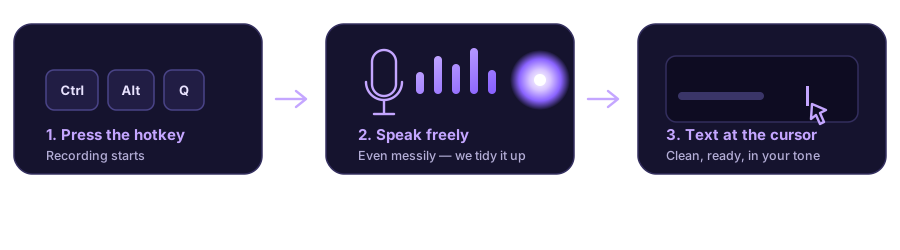
Not a dictaphone or a website — a tool that inserts recognized text where you work.
It doesn’t just transcribe — it turns speech into clean text, removing fillers, repeats and slips.
Accurate recognition in English and 100+ languages, plus instant translation on the fly.
Recognized text appears in the active window — Word, browser, email, messengers, CRM, code editor.
One press records, another stops and inserts. Tray icon, glow at the cursor. No complex setup.
The same dictation, formatted for the task: verbatim, business, concise, email, notes, message.
Audio is processed and deleted immediately — recordings are never stored to disk or cloud.
Three steps — and speech becomes text in the right window.
Any Windows app where you need text.
Speech is sent over a secure connection and recognized.
Polished, in your chosen tone. Always in the clipboard too.
Subscription with included minutes from $4.99/mo + minute top-ups. First 15 minutes free.
Luviomic is speech-to-text software for Windows. You speak and it turns your voice into clean, ready text inserted at the cursor in any app: Word, browser, messengers, CRM, code editor.
Luviomic is a Windows program installed once and used in any window by hotkey. Recognition runs on our server (internet required), nothing to configure.
The first 15 minutes are free, no card. Then a subscription from $4.99/mo or a one-time top-up.